Difference between revisions of "Zynthian Users Guide"
Jump to navigation
Jump to search
(Add Vangelis user guide) |
|||
| (44 intermediate revisions by 6 users not shown) | |||
| Line 2: | Line 2: | ||
==Main Guides== | ==Main Guides== | ||
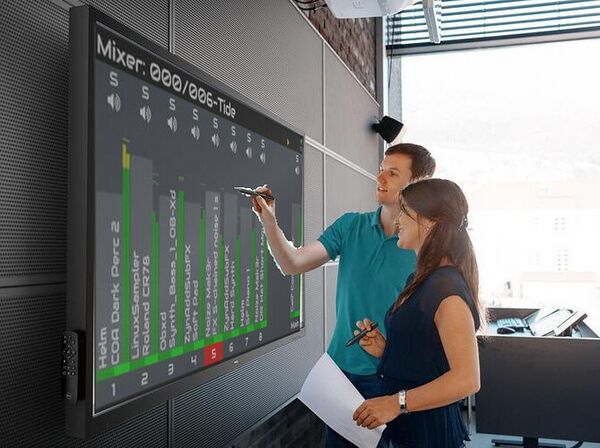
| − | + | [[File:Zynthian-mixer-blackboard.jpeg|600px|right]] | |
| − | * '''[[Zynthian UI User Guide - | + | *'''[[Zynthian UI User's Guide - Oram]]''' (incomplete but frozen): Oram is the current stable version. |
| − | * '''[[ | + | *'''[[Zynthian UI User's Guide - Vangelis]]''' (work in progress): Vangelis is the development version. |
| − | * '''[[ | + | *'''[[ZynSeq User Guide]]''': Zynthian's built-in step sequencer. |
| − | * [[ | + | *'''[[ZynSampler User Guide]]''': Zynthian's built-in non-destructive audio sampler. |
| − | * [[ | + | *'''[[Engines | Sound & MIDI Engines]]''': Info about the available engines (synths, audio FXs, MIDI processors, etc.) |
| − | * [[ | + | *'''[[Web Configuration User Guide]]''': Zynthian's built-in web interface, also known as '''''webconf'''''. |
| − | + | *'''[[Supported plug & play MIDI controllers]]''': Zynthian has default mapping configs for Novation, Akai, Korg and other controllers... | |
| − | * [[Adding LV2 plugins]]: | + | *'''[[Adding Encoders]]''': 4 Encoders can be added to a Zynthian ... |
| + | |||
| + | *[[MOD-UI User Guide]]: Pedalboard-style graphical interface for patching LV2 plugins. | ||
| + | |||
| + | *[[Command Line User Guide]]: If you need to manually setup/configure things. | ||
| + | |||
| + | ==Engines/Plugin Specific Guides== | ||
| + | |||
| + | There are some guides on specific engines available in Zynthian. They cover topics such as configuration, managing and importing presets etc. Some of them are listed below, for a full list see [[Engines#Zynthian Native Engines]] | ||
| + | |||
| + | *[[DrumGizmo]] Open source, multichannel, multilayered, drum plugin | ||
| + | *[[GeonKick]] Free software for generating a wide range of percussive sounds | ||
| + | *[[Perfomix]] Automated build-up audio effects with looper function. | ||
| + | *[[Drum Kits as LV2 plugins]] | ||
| + | |||
| + | ==Un-official Guides== | ||
| + | * [[Notes on Oram: some differences and new features]] | ||
| + | |||
| + | ==Legacy Guides== | ||
| + | |||
| + | *[[Zynthian UI User Guide - V5|Legacy Zynthian UI - V5 User Guide]] (old stable-2401) | ||
| + | |||
| + | *[[Zynthian UI User Guide - V1/V4|Legacy Zynthian UI - V1/V4 User Guide]] (old stable-2401) | ||
| + | |||
| + | *[[Zynthian UI User Guide (oldstable-2109)|Legacy Zynthian UI User Guide]] (old stable-2109) | ||
| + | |||
| + | ==Advanced Guides== | ||
| − | * [[ | + | * [[Zynthian Hardware]]: Using custom hardware with Zynthian for DIY setups (audio, displays, rotary encoders etc.) |
* [[Adding Extra I/O with the Zynaptik Module]]: Adding the Zynaptik extra I/O Option | * [[Adding Extra I/O with the Zynaptik Module]]: Adding the Zynaptik extra I/O Option | ||
| − | * [[ | + | * [[Adding LV2 plugins]]: Adding LV2 plugins to the system. |
| + | |||
| + | * [[MIDI Network]]: Receive/Send MIDI with RTP-MIDI & QMidiNet | ||
* [[Understanding LINUX Audio]]: will help you understand the acronyms mentioned in this Wiki | * [[Understanding LINUX Audio]]: will help you understand the acronyms mentioned in this Wiki | ||
| + | |||
| + | * [[Aligning Zynthian Touchscreens]]: Guidance for non-standard Zynthian screens. (Update: For reference, touchscreen calibration now available within the UI) | ||
==Beginners== | ==Beginners== | ||
| − | * '''[[Building_a_Zynthian_Box_using_an_official_Kit_v3#First_Boot|First Steps]]''': ''A brief tutorial on basic UI usage'' | + | * '''[[Building_a_Zynthian_Box_using_an_official_Kit_v3#First_Boot|First Steps]]''': ''A brief tutorial on basic UI usage for Version 3'' |
* '''[[Quick Start]]''': ''A beginners tutorial on how to make a piano snapshot'' | * '''[[Quick Start]]''': ''A beginners tutorial on how to make a piano snapshot'' | ||
| Line 38: | Line 68: | ||
==Video Guides== | ==Video Guides== | ||
====English==== | ====English==== | ||
| − | <embedvideo alignment="inline" dimensions="451" service="youtube" description=" | + | <embedvideo alignment="inline" dimensions="451" service="youtube" description="The best Open Source GrooveBox, by Floyd Steinberg" urlargs="start=553">https://www.youtube.com/watch?v=dtdIqBiWdjk</embedvideo> |
| + | <embedvideo alignment="inline" dimensions="451" service="youtube" description="Create your first song, by Floyd Steinberg">https://www.youtube.com/watch?v=TWmrk6LlEyg</embedvideo> | ||
| + | <br> | ||
<embedvideo alignment="inline" dimensions="451" service="youtube" description="SooperLooper, by Floyd Steinberg">https://www.youtube.com/watch?v=QPQT5gviZbo</embedvideo> | <embedvideo alignment="inline" dimensions="451" service="youtube" description="SooperLooper, by Floyd Steinberg">https://www.youtube.com/watch?v=QPQT5gviZbo</embedvideo> | ||
| + | <embedvideo alignment="inline" dimensions="451" service="youtube" description="How to Summon Entities with the Zynthian V5">https://www.youtube.com/watch?v=AP71cSRtdJc</embedvideo> | ||
<br> | <br> | ||
<embedvideo alignment="inline" dimensions="300" service="youtube" description="First Steps, by Sébastien Marty">https://www.youtube.com/watch?v=avUdv1uxYT4</embedvideo> | <embedvideo alignment="inline" dimensions="300" service="youtube" description="First Steps, by Sébastien Marty">https://www.youtube.com/watch?v=avUdv1uxYT4</embedvideo> | ||
| Line 50: | Line 83: | ||
<embedvideo alignment="inline" dimensions="300" service="youtube" description="V3: Interface utilisateur, by Benoit Bouchez">https://www.youtube.com/watch?v=4jb-8cQQQgQ</embedvideo> | <embedvideo alignment="inline" dimensions="300" service="youtube" description="V3: Interface utilisateur, by Benoit Bouchez">https://www.youtube.com/watch?v=4jb-8cQQQgQ</embedvideo> | ||
<embedvideo alignment="inline" dimensions="300" service="youtube" description="Edition SFZ et SF2, by Benoit Bouchez">https://www.youtube.com/watch?v=odfyOLWh93k</embedvideo> | <embedvideo alignment="inline" dimensions="300" service="youtube" description="Edition SFZ et SF2, by Benoit Bouchez">https://www.youtube.com/watch?v=odfyOLWh93k</embedvideo> | ||
| + | |||
| + | <!-- | ||
| + | ====German==== | ||
| + | <embedvideo alignment="inline" dimensions="906" service="youtube" description="V5: Tutorial zum Einstieg, by Martin Gerken">https://www.youtube.com/watch?v=8iIv0w_2PsA</embedvideo> | ||
| + | --> | ||
Latest revision as of 06:26, 6 March 2026
1 Main Guides

- Zynthian UI User's Guide - Oram (incomplete but frozen): Oram is the current stable version.
- Zynthian UI User's Guide - Vangelis (work in progress): Vangelis is the development version.
- ZynSeq User Guide: Zynthian's built-in step sequencer.
- ZynSampler User Guide: Zynthian's built-in non-destructive audio sampler.
- Sound & MIDI Engines: Info about the available engines (synths, audio FXs, MIDI processors, etc.)
- Web Configuration User Guide: Zynthian's built-in web interface, also known as webconf.
- Supported plug & play MIDI controllers: Zynthian has default mapping configs for Novation, Akai, Korg and other controllers...
- Adding Encoders: 4 Encoders can be added to a Zynthian ...
- MOD-UI User Guide: Pedalboard-style graphical interface for patching LV2 plugins.
- Command Line User Guide: If you need to manually setup/configure things.
2 Engines/Plugin Specific Guides
There are some guides on specific engines available in Zynthian. They cover topics such as configuration, managing and importing presets etc. Some of them are listed below, for a full list see Engines#Zynthian Native Engines
- DrumGizmo Open source, multichannel, multilayered, drum plugin
- GeonKick Free software for generating a wide range of percussive sounds
- Perfomix Automated build-up audio effects with looper function.
- Drum Kits as LV2 plugins
3 Un-official Guides
4 Legacy Guides
- Legacy Zynthian UI - V5 User Guide (old stable-2401)
- Legacy Zynthian UI - V1/V4 User Guide (old stable-2401)
- Legacy Zynthian UI User Guide (old stable-2109)
5 Advanced Guides
- Zynthian Hardware: Using custom hardware with Zynthian for DIY setups (audio, displays, rotary encoders etc.)
- Adding Extra I/O with the Zynaptik Module: Adding the Zynaptik extra I/O Option
- Adding LV2 plugins: Adding LV2 plugins to the system.
- MIDI Network: Receive/Send MIDI with RTP-MIDI & QMidiNet
- Understanding LINUX Audio: will help you understand the acronyms mentioned in this Wiki
- Aligning Zynthian Touchscreens: Guidance for non-standard Zynthian screens. (Update: For reference, touchscreen calibration now available within the UI)
6 Beginners
- First Steps: A brief tutorial on basic UI usage for Version 3
- Quick Start: A beginners tutorial on how to make a piano snapshot
- Making some sounds: A beginners tutorial on how to make your Zynthian make some sounds
7 Video Guides
7.1 English
7.2 French