Teenage Engineering OP-1
Jump to navigation
Jump to search
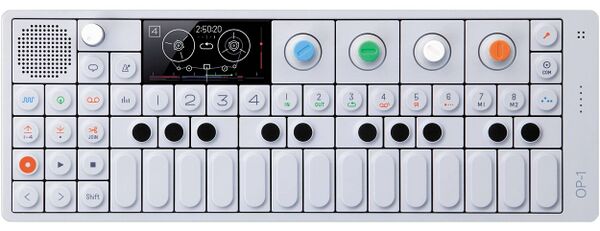
1 Teenage Engineering OP-1

The OP-1 is detected and the driver is enabled automatically.
Available in vangelis. Designed for OP-1 Original (OG). Tested with latest firmware version 246. Designed to work with OP-1 in MIDI Mode.
1.1 Configuring the OP-1
To enable the driver integration, on the OP-1:
- Press Shift + COM Button
- Select CTRL Mode (Press Button T2)
- Additional steps for the first time:
- Press Shift button to verify knobs are sending relative CC, change with blue encoder if needed.
- Press Shift button to verify <> buttons are sending MIDI CC, change with white encoder if desired. Set to Octave ± if this behavior is preferred.
- Optionally configure MIDI channel as described here.
To switch to regular OP-1 mode
- Press Shift + COM Button
- Select OP-1 Mode (Press Button T1)
1.2 Usage

- Encoder rotation (left to right is 1 to 4)
- Encoder button push (and release, so short/bold/long works as expected)
- Tempo
- Play/record toggle
- Arrows up-down, left-right