Akai MIDI MIX
Jump to navigation
Jump to search
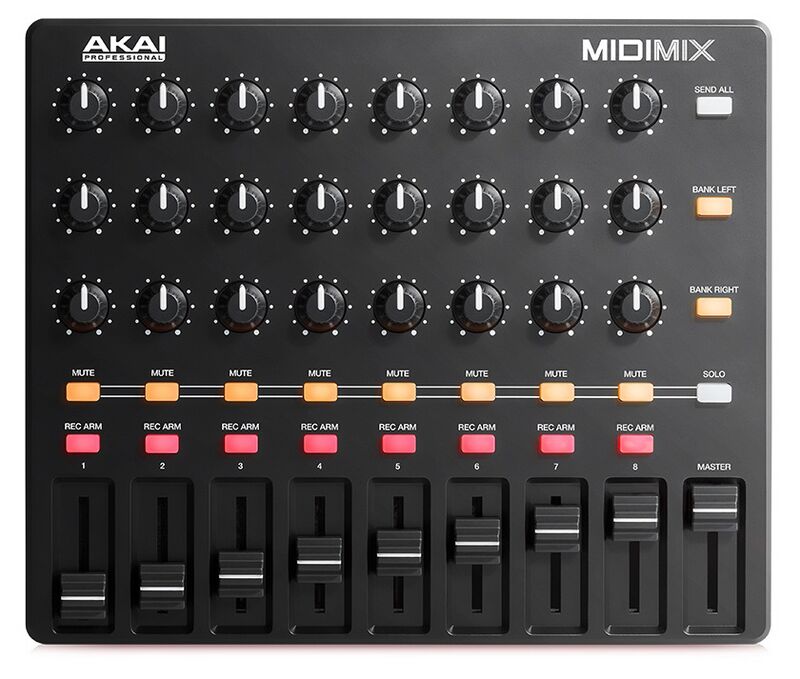
ZynMixer driver

This Akai MIDIMix driver maps the basic mixer's functionality. Chains are numbered from left to right as shown in the zynmixer screen. Note that these numbers are not MIDI channels!
- Bank Left: Strips assigned to chains 1-8
- Bank Right: Strips assigned to chains 9-16
- Master Slider: Main volume
- Strip 1-8: Chain's mixer control, depending on bank selection
- Upper Knobs: The 2 upper knobs are available for MIDI learning.
- Lower Knob: Chain's balance
- Mute: Chain's mute switch
- Solo: Push
SOLOto see solo status. PushSOLO+MUTEfor toggling solo. - Rec Arm: Red light indicates active chain. Push to set active chain.
- Slider: Chain's volume